

Previously:
Office 365 Part 1 – Overview
Exchange Online is the compelling piece of Office 365 for small businesses and law firms. Even the smallest business should be considering the advantages of using Exchange to run its mail system, and Office 365 is now the most effective way to get the benefits of Exchange.
I have been promoting hosted Exchange mailboxes for small businesses for years. For a small monthly subscription fee, small businesses can get the full value of mail hosted by Exchange Server, without the complexity and risk of running Exchange Server onsite.
This is what hosted Exchange mail offers to small businesses.
- MULTIPLE COMPUTERS The same Outlook folders can be displayed on multiple computers (PC or Macs) at multiple locations. You can use your Outlook folders seamlessly from a desktop computer at the office, a desktop computer at home, and a notebook computer on the road, and Outlook is always up to date at all locations.
- SMARTPHONES AND TABLETS iPhones and iPads, Android phones and tablets, and Windows phones can sync email, calendar, and contacts over the air continuously. Blackberries are fully supported (although there might be an extra charge by the carrier for an enterprise plan).
- MULTIPLE LOCATIONS Office workers can be linked together and share Outlook folders even if they are in different offices.
- WEBMAIL Outlook folders can be accessed online through Outlook Web Access – full access to all Outlook folders presented in Internet Explorer, like other webmail services.
- SHARING Calendars and address lists can be shared with other people in the office.
- SECURITY Microsoft provides enterprise-class virus and spam filtering.
- REDUCED COSTS Microsoft is responsible for backups, database maintenance, security updates, and upgrades.
Each employee gets 25Gb of mailbox storage space, and a robust mail system that can handle mail attachments up to 25Mb.
WHAT’S NEW IN OFFICE 365
The basic features of Exchange Online in Office 365 are similar to the hosted Exchange service from Microsoft being used by many of my clients. Behind the scenes, the new service is powered by Exchange Server 2010, a more recent version than the servers running Microsoft Online Services. That has a few consequences:
- IMPROVED OUTLOOK WEB ACCESS Microsoft has polished Outlook Web Access to a high sheen. Each generation looks more and more like the standalone Outlook program, to the point that the web version is a plausible alternative to the full program. Outlook Web Access in Office 365 will display with all features in Chrome, Firefox, and Safari, unlike the current version that displays a stripped-down view.
- BETTER PERFORMANCE Microsoft was fairly embarrassed by the mail outages in Microsoft Online Services, including one just a week before the launch of Office 365. The current line is that Exchange 2010 is a far more robust platform designed for precisely this kind of service, and Microsoft promises that the service will be more resilient and have less downtime.
- BETTER SUPPORT FOR MOBILE DEVICES Behind the scenes, we should have a greater ability to wipe mobile devices that have been lost or stolen.
- EASIER DAY TO DAY USE Instead of a separate Sign In Program, the new service integrates more deeply into Windows and Outlook. A password will still be entered every time you log in but it is designed to be persistent and provide access to all Office 365 services.
- NO SUPPORT FOR OUTLOOK 2003 The improved webmail might soften the blow when businesses with older computers discover that Outlook 2003 simply won’t connect to the Office 365 mail servers. It’s always an option to replace the old computers or buy a copy of Office 2010 but it might be sufficient for some employees to use Outlook Web Access exclusively.
PASSWORDS
The biggest unanswered question is whether passwords can be set not to expire. Microsoft enforces perfectly reasonable security requirements for complex passwords, changed every 90 days. Some of you have told me gently that you’d rather not have to change your passwords. Actually, all of you have told me that, sometimes while waving baseball bats and bicycle chains in my direction. Office 365 exposes new controls for administrators but some of them are limited to the Enterprise level plans. I don’t know yet if I can relieve you of the 90-day password change.
This page has various documents about the enterprise version of Office 365. This appears in “Office 365 Identity Service Description”:
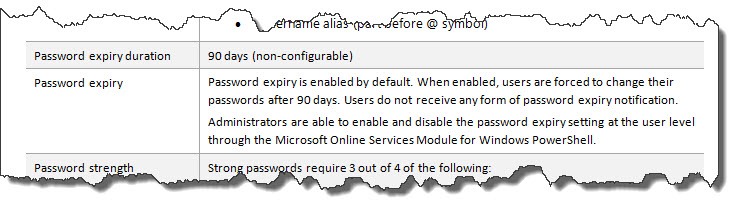
“Users do not receive any form of password expiry notification.” Really? No balloon pops up? Oh, dear. That’s not good, not good at all.
It goes on to say that “administrators are able to enable and disable the password expiry setting.” That would solve the problem, but I won’t believe it until I see it. This document is written for enterprise administrators. I might not have access in the Office 365 plan for small businesses to the password expiry setting.
My nightmare is the possibility that Office 365 is set up for your password to expire every 90 days without warning. I know my clients. Take my word for it. This single little issue could be, quite literally, a deal-killer. I’ll know the answer before I set any of you up with this service, I promise.
Enterprises will be able to take advantage of a new single sign-on feature, where the password used to log into the computer is also the Office 365 password. Later this year single sign-on may be possible for businesses that install Small Business Server 2011 Essentials but otherwise small businesses will not have access to that level of convenience; it requires a separate server onsite running a complex Microsoft service, Active Directory Federated Services.
Next: a few words about Sharepoint
