

Windows Search 4 is one of the most valuable services on your computer. It’s highly recommended for everyone using a Windows PC, as well as for servers in small businesses, but it is remarkably difficult to find out if it’s installed and working. I’ll give you some background, then show network administrators a trick for Windows Server 2008.
Briefly, Windows Search 4 efficiently indexes all of the data on your computer – the file names plus the full contents of every file, plus everything in your Outlook mailbox – and allows you to do searches that return results instantly.
The most interesting technology in Windows Search 4 is “remote query” or “remote index discovery.” A computer with Windows Search 4 responds to a search query from a remote computer by consulting its own index and sending the search results. When Windows Search 4 is running on a server sharing company documents, the server returns the results instantly with high accuracy and a minimum of network traffic. Here is some background about Windows Search 4, and here are instructions about using it to search shared folders on a server.
To the best of my knowledge, this is the current status of Windows Search 4:
- Windows 7 – includes the Windows Search 4 technology but does not use the name.
- Vista – Windows Search 4 is included in Vista Service Pack 2. (By this time, all Vista computers should have Service Pack 2. Right-click on Computer and click on Properties to see the service pack on your Vista computer; if you don’t have Service Pack 2 yet, install it manually.)
- Windows XP – Windows Search 4 can be installed manually; it’s offered as an optional update so it’s often overlooked in the Automatic Updates system. When it’s installed on WinXP, a search toolbar and magnifying glass will appear down on the taskbar in the lower right.
- Outlook 2007 – When Outlook 2007 is installed on a computer that doesn’t have Windows Search 4, it will offer to install Windows Search 4 at the same time to power instant searches within Outlook.
- Windows Server 2003 (including Small Business Server 2003) – Windows Search 4 can be installed manually.
- Windows Server 2008 (including Small Business Server 2008) – Windows Search 4 is included in Windows Server 2008 Service Pack 2 – it’s the same service pack that’s installed on Vista computers, courtesy of the code base they share. All Server 2008 computers should have Service Pack 2 installed but I still run into servers that have not received it as a Critical Update because there are prerequisites that haven’t been installed or have gone awry. Install it manually on Server 2008 boxes, including Small Business Server 2008 systems!
Here’s the wrinkle. Even if Windows Search 4 is installed on Windows Server 2008, the search service is turned off until it is explicitly activated.
Microsoft only wants the Search 4 indexing service to run in small workgroups. Larger companies are told to move to enterprise-level search solutions.
The ability to do instant searches in a shared CompanyDocs folder is so important to small businesses that I track the search programs carefully. Nonetheless, I had no idea an extra step was necessary until I found it by accident. Follow these steps to activate the Windows Search Service on Windows Server 2008:
- Start Server Manager
- Click on Roles in the left navigation pane
- A server in a small business will normally have the File Services role installed, and File Server will be listed under Role Services.
- In the File Services section, select Add Role Services on the right.

- Add the Windows Search Service.

- Choose the volumes with shared folders to be indexed – preferably not the system volume.
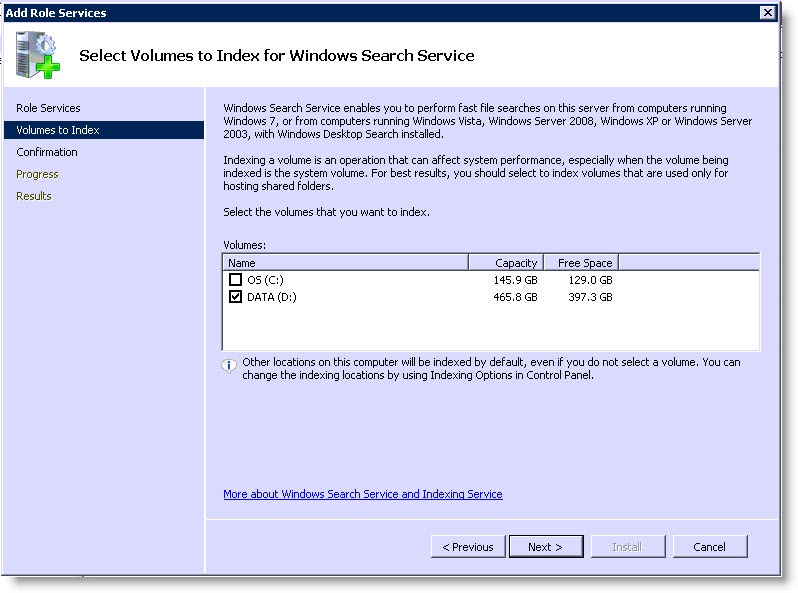
Finish the wizard and you should have the Windows Search service up and running.

Make sure Windows Index Server is not running. You can not run WSS and WIS at the same time.
True. Windows Indexing Service made its final appearance as an optional service in Server 2008 and Windows 7, not activated by default and only intended for backwards compatibility. You’re right, I think – they can’t both be running.
I have an SBS 2008 server and I keep reading this advice on getting Windows Search working. My problem is that I _cannot_ expand the “File Services” role and thus cannot install WSS!
The check mark for the top level File Services is grayed and there is no way to expand this entry to get to what’s underneath it.
Help?
Hi, this is a great advice, my company is suffering because of a lot of files and no indexing.
thanks again
Paul