

Adware has started to turn up again, using Chrome extensions and notifications as a way to display annoying ads and muck up the time we spend on our computers and phones – as if we didn’t have enough to worry about.
In the old days, we installed adware on our Windows computers when we clicked “yes” on the wrong website popup or as unwanted companions to “free” programs. Adware programs could be uninstalled from Control Panel / Installed Programs.
Now the same crap can be run as an extension to Chrome, which doesn’t show up on the list of installed programs in Windows. Worse, if you’re not careful you’ll be overrun with notifications on your phone, too.
Let’s start with the basics.
How do you know if there’s adware on your computer?
Your browser home page is changed; your search results come from an unfamiliar place instead of Google (especially “Ask,” one of the worst offenders); notifications full of ads are popping up from the bottom right corner; there are toolbars at the top of the browser that you don’t recognize; links on web pages are underlined and ads pop up when your mouse goes over them; you type in one website but you’re redirected to another one; unfamiliar programs start appearing in the middle of the screen claiming something needs to be done to your computer – oh, and all too often your computer also starts to slow down and programs start crashing. Any or all of those symptoms might mean you’ve picked up something unwanted, and of course that’s not an exhaustive list.
Who are these swine?
They’re executives who wear suits to work and get paid a lot of money and face no consequences for what they’re doing.
The people distributing malware and viruses are anonymous criminals in Russia or Eastern Europe or someplace else a long way from here. In your mind, they’re dressed in t-shirts and they talk to each in guttural tones and you have this vague feeling that they could be put in jail.
The advertisers aren’t doing anything illegal. That’s the problem.
Doesn’t an antivirus program stop this stuff?
No, no, you don’t understand. These aren’t the bad guys. In the eyes of the law, these are good guys. The only people who think this should be stopped are each and every computer user in the world, and our opinions don’t count when it comes to Making Money.
What are Chrome extensions?
Extensions are small programs that customize the Chrome browsing experience. There are thousands of them, many of them in the Chrome Web Store. Some work behind the scenes; some display an icon in the upper right corner of Chrome. On my computers, for example, I’ve got icons in Chrome for extensions for LastPass, Acrobat, uBlock Origin ad-blocker, and OneNote. Power users might have dozens running, carefully chosen to help get work done and manage security and privacy. Tech journalist Mike Elgan has an interesting list of more than thirty trusted Chrome extensions here, to give you an idea of the range of what’s out there.
You can see the extensions you have installed in Chrome by clicking on the three dots in the upper right corner / More tools / Extensions.
Which extensions are the bad ones?
There is nothing wrong with legitimate Chrome extensions! They are helpful and in some cases essential tools. There is no reason to feel you need to get to zero extensions. Here are a few categories of extensions that are just fine:
• Google installs a number of extensions for Google services. You can expect to see extensions for Docs, Slides, Sheets, and perhaps a few others from Google.
• Things you’ve installed on purpose or that come from familiar companies are almost certainly safe to leave in place. For example, you might have extensions from Microsoft for Office services, from Cisco for WebEx meetings, or from any number of other companies whose services or programs you have used.
• Of course, extensions that you have personally chosen on purpose from safe sources are the reason that extensions exist. Use them happily.
Now stare at the ones that are left. If they say something about helping you search, or helping you with your mail or with maps or with coupons (shudder), or tracking the weather, or almost anything else that doesn’t sound familiar, look at them with suspicion and think about removing them. Theoretically they can’t hurt you when the slider is set to make them inactive, but neatness makes me want to have them gone.
In extreme cases, extensions can be used as malware to track you or steal personal information. It happens occasionally despite Google’s best efforts. The bad guys have an incentive to use extensions as a way past your defenses; since Chrome is a trusted application, antivirus programs typically give extensions a free pass when you give them permission to run.
What about notifications?
You’re used to notifications. Your phone pops up a notice or makes a noise when you receive an email or text message. You might have dozens of phone apps that send notifications, lining up tiny incomprehensible icons along the top of the screen.
Windows 10 has its own notification system – the little conversation icon to the right of the date and time on the taskbar. Everyone ignores it. It’s full of notices about how Windows Defender has kept you safe, or you have new email, or various programs have updates. Some of the notifications also pop up windows at the bottom right of the screen.
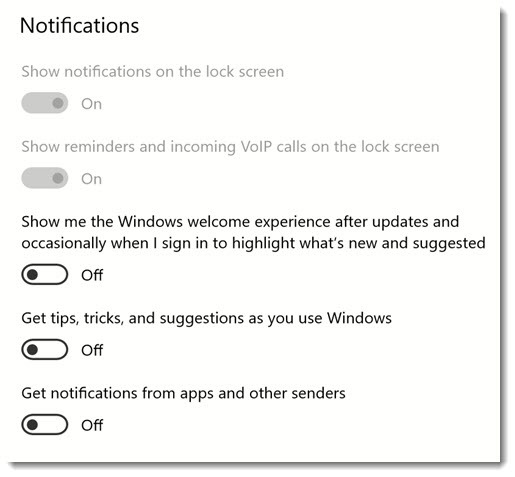
You can turn off Windows notifications by going to Settings / System / Notifications and actions and turning them all off with the three sliders in this screenshot, or you can turn off notifications from individual apps in the section below that.
What about Chrome notifications?
Until now, Chrome has handled notifications from websites by itself. The experience is similar – a window appears in the lower right corner of the screen – but it’s all handled by the Chrome browser. Here’s a typical Chrome notification:
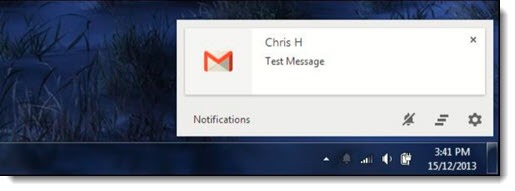
When notifications are turned on in Chrome, the browser runs a little bit of itself behind the scenes even when the main browser window is closed so it can alert you when a new message is received in Gmail or the like.
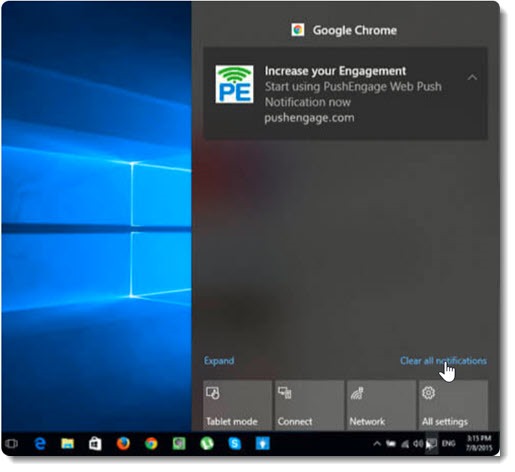
Google is in the process of rolling out an update to Chrome that will merge its notifications with other Windows 10 notifications. Chrome will still be in charge but the notifications will look exactly like other Windows notifications, like this:
There are almost certainly a number of notifications already allowed by Chrome on your computer. You can see a list of websites that are allowed to send notifications in Chrome by clicking on the three dots in the upper right / Settings / scroll down and click on Advanced / Content settings / Notifications. In the Allow section you will see notifications for Google services like Docs or Gmail, and perhaps some others that you’ll recognize that are trusted friends.
But you might also see some that you don’t recognize, and that’s where the problems are starting to turn up.
What problems can notifications cause?
I’m starting to see a pop-up window like this on more and more websites.
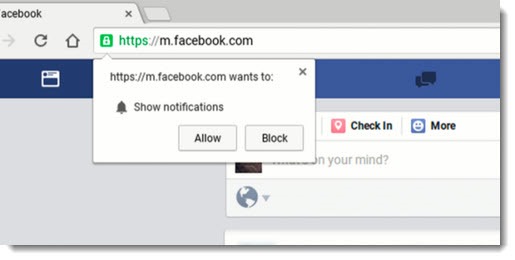
“http://randomwebsite wants to: Show notifications. Allow / Block.”
Block them. Block them! We are in the habit of agreeing to too many things online, clicking okay on license agreements and program installation windows willy-nilly. But you need to be in the habit of clicking Block on request to allow notifications on your phone and on your computer.
Most of the time you don’t want those notifications regardless of whether it’s a legitimate website or not. How many sites do you want to have popping up windows because a news article has been posted or a Facebook friend has put up another video?
Each one requires resources from your computer or your phone to run Chrome while it checks for those notifications. Each one interrupts your workflow with a nonstop barrage of pop-pop-pop windows.
And now I’m starting to see them fill up with ads when a shady website gets permission to insert itself in the notification process. Imagine things like this starting to appear in the corner of your Windows screen.
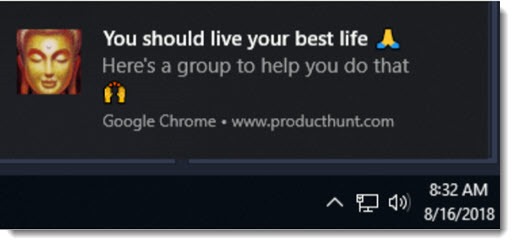
You can block all Chrome notifications by turning off “Ask before sending” in Chrome’s Notifications settings. If you think you’re getting unwanted notifications, at least go down the list of sites in Chrome that are allowed and block or remove anything that shouldn’t be there. Don’t let new ones in.
The bad guys in the advertisers have similar goals in some ways: they are both constantly looking for new avenues to push things in front of your face that you didn’t ask for. Be alert and don’t let them get you down.

I made a previous comment a little while ago I need to amend: the ads have returned so I don’t know what exactly is the issue now but it might not have been that specific extension. Still a lesson learned in being careful online though 🙂
I found this article when I downloaded an extension that SHOULD be trusted, Rakuten (which I have used on my phone for months and even received a check from for cash back, they’re actually legit). Alas, I began seeing ads on each Youtube video I click on. I have Adblock and never see an ad unless I allow it to be seen (which I sometimes do when I want to support a creator I really like) but I haven’t done so recently so when I started seeing these 5-6 second ads promoting businesses I’ve never heard of I was immediately suspicious since Rakuten is the only thing I’ve downloaded previously. I made a report about how they do not state that this will happen or that if they do, it’s buried somewhere in their terms and conditions. This might be a legal practice but it is a scummy one nonetheless. The extension was uninstalled and the ads have stopped, so that was definitely what it was. Be careful who you trust… it seems even legitimate businesses are not above this scummy behavior.
Thank you so much for this article. Yesterday I went to a website that converts youtube videos to mp3. I have done this on one specific site until yesterday when I randomly chose a website after I googled “convert youtube to mp3”. This website never did convert successfully so I should have known something wasn’t quite right. Then today, I opened my laptop and within a few minutes, I started seeing notifications popping up at the bottom of my screen. One about every 5 minutes or so. Each one said something about weight loss and at the bottom, it showed the youtube to mp3 website name and Google Chrome in smaller font. A few minutes ago I got on Google Chrome help and told them my situation and they told me it was a virus & I needed to get an antivirus to scan & remove it from my computer. I didn’t think this answer was correct so I started Googling and found this article. It definitely has something to do with chrome notifications, not a virus. I also scanned my computer with Windows Defender and it showed no viruses. I went through my extensions and deleted everything except the ones that were already installed (like docs, etc.) but the message is still popping up. Is turning off chrome notifications the only thing I can do to not see this? I would much rather remove whatever this is completely from my computer. Thanks so much.
Kayla
I’m running into rogue notifications in Chrome frequently these days – separate from extensions. In Chrome, click on the three dots in the upper right / Settings / scroll down and click on Advanced / Content settings / Notifications. In the Allow section you will see notifications for Google services like Docs or Gmail, and perhaps some others that you’ll recognize that are trusted friends. Remove more or less everything else. The change will take effect when you close and restart Chrome (or restart the computer). With luck, you’ll be free of notifications for a while.
I just started getting small notification rectangles in upper right screen–they seem o be news items but I never got them before. The URL doesn’t matter as they pop up on top of any web page I use Chrome for–why is this happening all of a sudden–and how do I stop it ASP–or I’ll just stop using Chrome at work and home. Thanks.