

Previously:
Law Firms In The Cloud: Credenza
Law Firms In The Cloud: Rocket Matter
Until now very small law firms have seldom used a true document management system, but even the smallest firm is starting to feel pressured to consider one to deal with an ever-increasing number of files. NetDocuments has the forward-facing features that put it at the top of the list of document management systems to consider.
It’s easy to start out with nothing but a moderately well-organized filing system – folders named after clients, files named more or less according to a system, and drafts emailed from person to person. When someone “loses” a folder by accidentally dragging it into another folder, or an early draft is accidentally filed with the court because the final edit was buried in an email attachment, people briefly discuss a better system, then shrug it away when they look at the cost and – more important – the changes that would be required in the habits of busy lawyers.
A document management system keeps track of the files. It helps you find them. It keeps copies of each version, with information about which one is current and who made what changes. It enforces a system of associating files with particular cases. Nowadays document managers also try to include email messages.
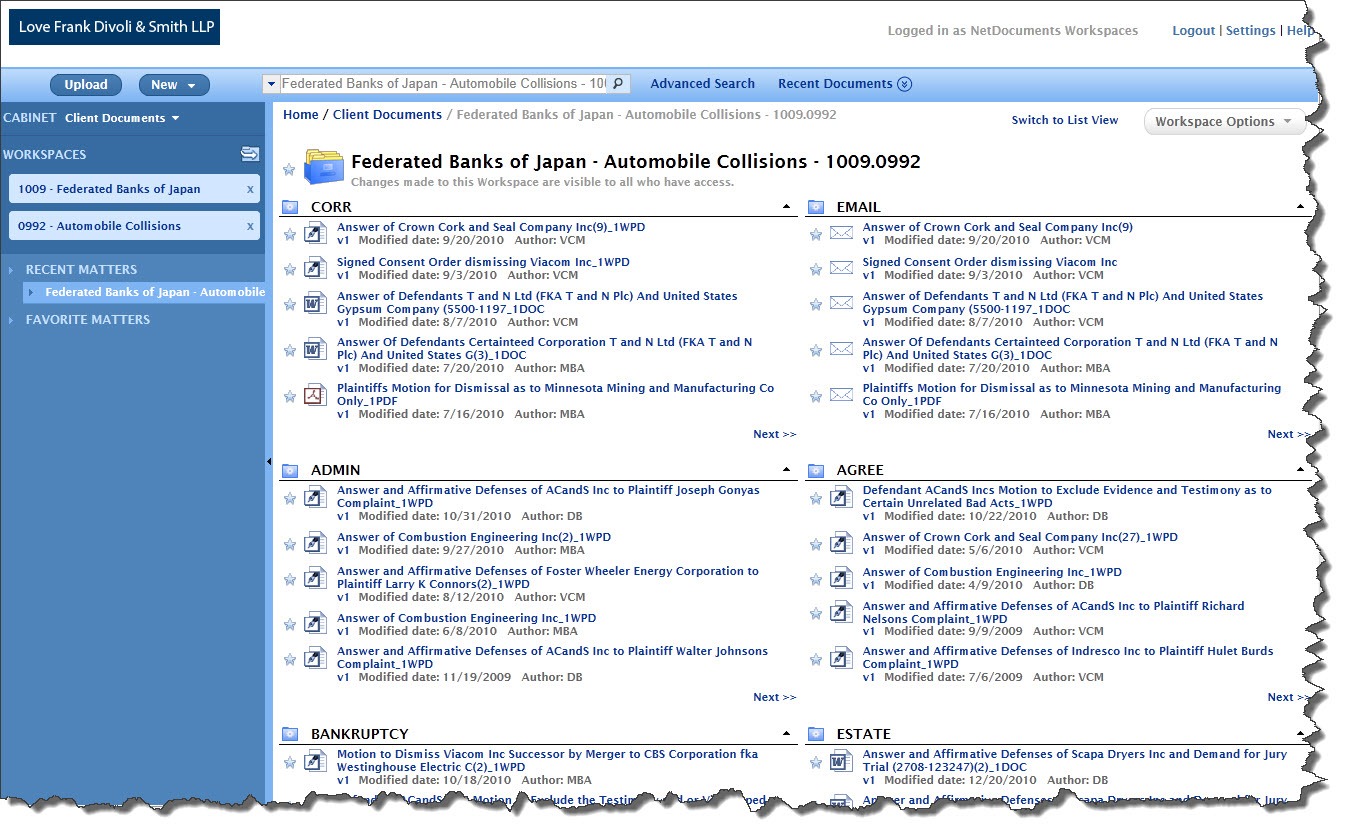
Once a document management system is in place, a single screen can display all the information about a case or client.
By definition, though, document management systems put a barrier between the users and the files. It’s there for everyone’s protection. There is no file system with a folder named after a client, containing a hundred files. All files must be opened and saved through the document manager.
If not introduced carefully, the lawyer who refuses to learn the system gets cranky and yells at staff. Paralegals weep. The office manager quietly begins circulating a resume.
NetDocuments has the same features as Worldox and most other document managers. There is a front end that offers rich feedback about files, able to be sorted and displayed in many ways, fully indexed and searchable.
There is an add-in for Microsoft Word and other programs so files can be opened and saved directly in and out of NetDocuments. Files can be shared with people outside the firm in flexible and interesting ways.
The difference is that all of the files managed by NetDocuments are stored online. The interaction with the system is done in a web browser. There is no server in the closet with a copy of the files. Old-timers find it very hard to accept the concept and let go of their files. The firm has to make a commitment to trust the security and availability of the NetDocuments service. For more than ten years, it has earned a reputation of deserving that trust.
There is quite a reward. All of the firm documents are available from exactly the same portal anywhere. The NetDocuments portal and all the firm’s documents are able to be accessed as readily from a notebook in the courtroom or from a partner’s home computer as they are at the office. A branch office will be completely integrated with the rest of the firm. You can use it effectively from an iPad. (You can use it in a theoretical sort of way from the web browser on an iPhone or Android phone but I can’t imagine trying to do anything useful on a four inch screen.)
The service got a face-lift a few months ago. The screens are well-organized and the whole thing has a clean and attractive design. Take five minutes and watch a video that shows off the new design and the core features.
If you want a little more, this two minute video and this information page are both specifically about NetDocuments in law firms.
Pricing, of course, is the hard pill to swallow. Like other cloud services, NetDocuments charges a monthly subscription price per person. The cheapest plan starts at $20/person per month, minimum two people. There are additional charges that can drive that price up significantly:
- Storage space begins at 10Gb, plus 1Gb per user. That’s a lot if you’re just starting out but it’s a fraction of the space that an existing firm might already have built up on its local server. If you save money by only storing a portion of your files online, it creates confusion about where to find files and takes away from the effectiveness of a central index. (And perhaps it leaves open a backdoor location for balky attorneys to store files and bypass the document management system.) NetDocuments will give you more storage space but the cost adds up fast.
- There are a couple of extra cost services that increase the monthly bill. The obvious one is an add-in for Outlook that makes it possible to send email messages to the NetDocuments system, filed by case, with a simple drag and drop. It’s a hugely important addition to the system. It’s also a 30% increase in the subscription fee, although extra storage space is thrown in to sweeten the deal.
- Paranoid firms might also want to have a local copy of the NetDocuments software and the firm database onsite, for “business continuity and extended peace of mind.” I’m not even going to give you the price. Let’s just say that peace of mind doesn’t come cheap.
Comparing the cost of a cloud-based system with a traditional onsite server-based system will make your head spin. It comes out to be closer than you might think.
- The monthly subscription fee for the cloud service is reasonably easy to calculate. Add something for local IT support to help out with the hard bits and it’s just about done. NetDocuments handles the backups and upgrades and maintenance.
- The total cost of the server in the closet is more than you might think. There’s the up front cost of the hardware and licenses, but that’s just the beginning. The hardware will need to be refreshed every few years and the licenses will likely require an annual maintenance plan to stay current. Backups are your responsibility, so you’ll be paying IT for the hardware and support to get them set up and keep them running. When hardware fails or a crisis needs attention, you’ll be paying the IT bill to fix things. You’ll pay the software vendor for the inevitable upgrades, and you’ll pay IT some more to install them.
As cloud-based services grow and become mature, we will cross an interesting line where your odds for business continuity and security will be better with online services than with onsite servers. I think we might already have crossed that line. Ready to go to the cloud? Give me a call.

I am a 2 attorney law firm in Palo Alto that runs macs and needs to move to a document management solution. I have IT experience and so hosting it myself is not a deal breaker, but would prefer it on the cloud.
Looking at netdocuments versus worlddox. Looking for a consultant with experience to help me make a decision, and then advise on uploading/organizing my current files to the new system.
Thanks,
Dan Hattis
mobile: 650.284.8495