
 Previously: Displaying Contacts In The Outlook Address Book
When you open the Outlook Address Book to address an email message, the names in your Contacts folder are sorted by first name. Lots of people want them sorted by last name. It’s one of those mildly irritating things that requires changing a deeply hidden setting. It seems like the kind of thing that would be listed under “Options” in the Address Book menu, doesn’t it?
Here’s the sequence from Windows 7 and Outlook 2010. It’s similar in earlier versions of Windows and Office.
- Open Control Panel.
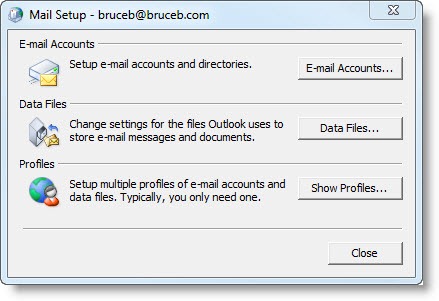
- Type “mail” in the search bar at the upper right, and click on “Mail (32 bit)”
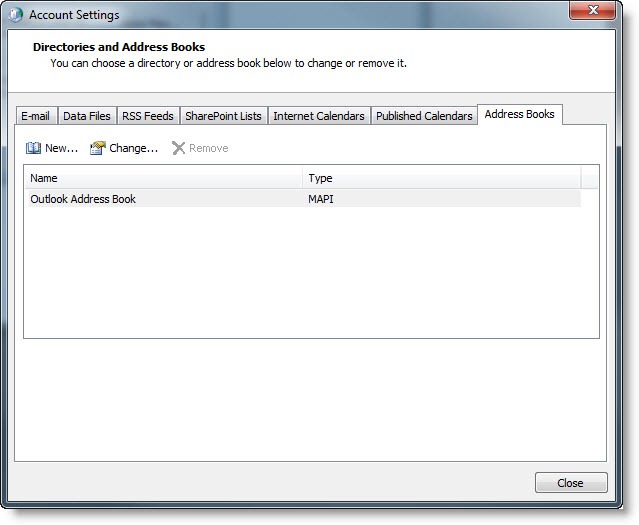
- Click on the “Email accounts” button
- Click on the “Address books” tab
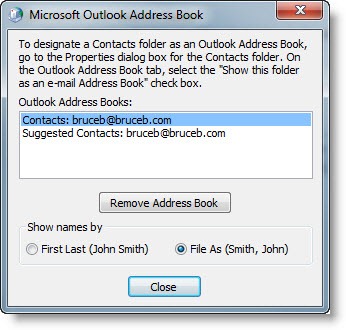
- Highlight “Outlook Address Book” and click “Change”
- Change “Show Names” to “File As (Smith, John)”

OMG!! Thank you. I’ve been struggling with this for years. I’m on Windows 10 and your directions did the trick. Happy New Year!
Thanks for the instructions–it worked just fine. As you suggest, why in the world isn’t this just in an “Options” tab vs. going through the Control Panel procedure?
I have tried to make this change from first-last to last-first exactly five times in the last 30 minutes following five different sets of instructions I found on the web, including microsoft.com. Nothing has changed. Thank God that Outlook programmers don’t design cars. The newest car model would have us driving our vehicles while locked in the trunk using a periscope and a left-handed joystick with labels written in Sanskrit.
Name sorting is getting even harder now because our mobile devices have their own rules about it, so I’m constantly running into lists that are scrambled in new ways that seem only vaguely related to first name or last name.
Thanks for the instructions – they worked like a dream.
Changing the sort from FN to LN should be straightforward. There was reason why hard-copy phone books were sorted by last name. Theoretically, everyone in a phone book could have the same first name – wouldn’t that be fun!
Hmm, for some reason this didn’t work. I’ve done all the steps twice, and it stays fn,ln format. I had everything working fine until my blackberry died and Verizon recommended an andriod phone (bad mistake). Among other things, that stupid phone reorganized my address book to the fn,ln format. So now what should I do? I have over 800 contacts, and don’t want to have to reenter them all…
Unusual things happen when contacts go through a phone. I have odd things added to the notes field in my Outlook contacts that seems to be the result of something done by the phone. When the phone is also syncing with another source of contacts (Google address book or the like), many weird things can happen. I’m not sure it’s just an Android problem.
My sorting order is muddled now too. I’ve dealt with it by giving up on scrolling for names – I do searches for names on the phone and in Outlook. it’s faster once you get used to it.
Thanks. I remembered there was a way, butfor the life of me I could remember how to do it.
I always have to look it up too. Glad you found this.
Thank you for this. I knew there was a way to do it but lost my printed instructions. I got a new computer and this has been driving me crazy. This was so helpful. I saved the instructions as a pdf for future reference!
Isn’t it funny that this is so deeply hidden? Glad you tracked it down.
Thankyou, thankyou, thankyou! I just set up a new PC with Windows 7 and Outlook 2007. I remember making this sorting change years ago, but forgot where it was buried in the Account Settings. It was drivng me crazy until I found your article on Google.
Why does Microsoft have to make these simple things so hard to do?
Thanks again.
– Tim