

Last year I wrote critical comments about the Fujitsu ScanSnap S1500 desktop scanner’s lack of a TWAIN driver. There’s a way around that shortcoming – one of those tips that’s easy when you find out about it but apparently not obvious, since Fujitsu’s Product Marketing Manager felt he had to write a blog post to point it out. The tip is below; let me give you some background about it.
The S1500 is a very likable scanner at a time when small businesses and law offices are scanning everything they see.
- Inexpensive all-in-one printer/scanners are too slow for anything other than casual use. I hate watching people’s faces fall when their new all-in-one slowly . . . deliberately . . . gently eases the first piece of paper through the feeder and pauses for a moment as it mulls over the next page.
- The big floor-standing leased units used to be called “copiers,” but now they’re more accurately called “scanners.” They suck pages through at the speed of light and create PDFs with wild abandon. They’re also expensive and fragile.
- In the middle are the surprisingly small desktop units. For a long time the best choices were the Xerox Documate 152 ($400) and Xerox Documate 252 ($850).
Last year Fujitsu got positive reviews when it introduced the Fujitsu ScanSnap S1500 ($420), with faster scan speeds at the same price as the Documate 152. When I ran into it last year, it upset me that Fujitsu did not let the scanner talk to the computer through an industry-standard TWAIN driver. As near as I could tell, all scanning had to be done with Fujitsu’s proprietary software instead of scanning directly from Adobe Acrobat 9. Fujitsu advertised that as a strength. Here’s Fujitsu’s graphic about the wonderfulness of its “Rack2-Filer” software.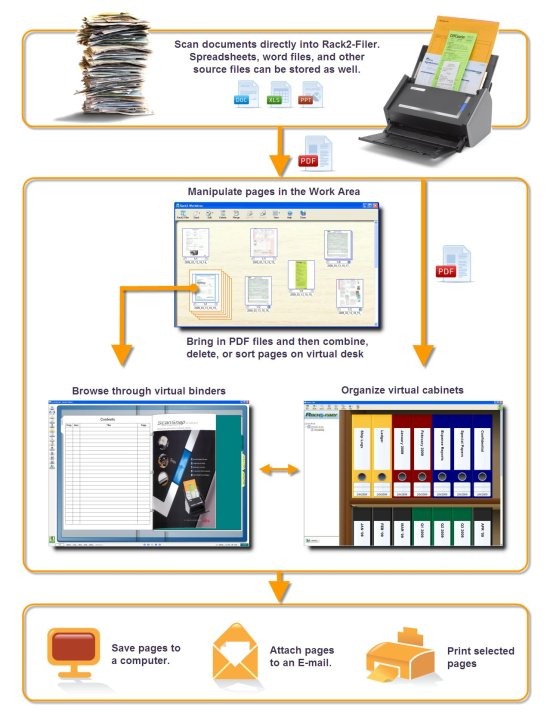
“Virtual binders” and “virtual cabinets” make me do virtual throw up in my virtual mouth. I see proprietary interfaces with a learning curve that distracts from more productive time spent learning the power of Adobe Acrobat.
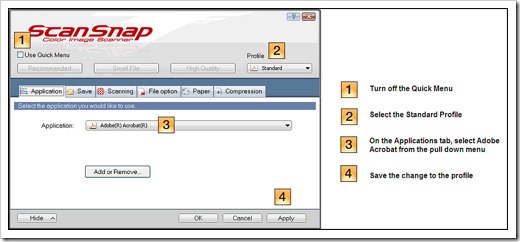
A simple change in the Fujitsu ScanSnap software sends scans directly to Adobe Acrobat. The scan still has to be started from the Fujitsu software but it can arrive in Acrobat with no intermediate steps. That’s not the way the scanner software was installed by default when I worked with it, and the Product Manager admits that “the standard profile is often changed by the user without realizing it.” Apparently the settings can also be lost if a new version of Acrobat is installed.
The instructions are easy.
- Turn off the Quick Menu.
- Select the Standard Profile.
- On the “Application” tab, select “Adobe Acrobat” from the pull down menu.
- Click “Apply” and “Ok” to save these changes to your profile.
With that change, the Fujitsu becomes a pretty appealing choice for a small, fast scanner.

Michael,
There is s solution now. JSE offers at http://www.jse.de/products.html#snaptwain a commercial TWAIN driver for the Fujitsu ScanSnap scanner models. If you still like to use the SnapScan with your dental software you can use the free trial version. I have a iX1500 but it should run with the older models as well, at least with iX500.
Greeting
Karl
This is a horrible idea for any medical business because most EMRs require TWAIN drivers to scan. Causing problems in purchasing.
I purchased a ix500 and thought it had capability to scan as a .tiff file and I cant find the interface to do so. Any luck out there?
Can scansnap be used with laserfiche? I used the above work around but still can’t see the scanner for a laserfiche source. Thanks.
Without a twain or WAI driver this scanner is worthless to me. Not even good for a boat anchor.
I design software for municipalities and had planned to distribute this as part of my package
My software currently uses several other brands of scanner, but the Fujitsu looked very appealing because of it speed
My software scans directly into my program which files using my own method (usually by parcel ID), and provides a thumbnail
I serve 80 out of 566 municipalities in NJ and my market share is growing
So long, Fujitsu
It’s horses for courses really isn’t it?
I originally found the lack of a TWAIN driver strange, if not a little frustrating. I reasoned that the hardware was already there, it ought to have been possible to offer a TWAIN option in parallel with the proprietary interface. But I am not a software engineer so I don’t know how feasible that is.
However, as time has gone on, a TWAIN driver has gone from being “the missing feature” to “the feature that isn’t missed”. I own and operate a small law practice and use the S1500 for archiving purposes. The fact that it is quick, scans in duplex (but cleverly skips blank pages), takes mixed size papers (so you don’t have to separate out file notes) and auto corrects/rotates, means this is really the most straightforward way of bulk scanning on a budget.
Occasionally I do want to scan in a photograph to include it in a document, and my graphics application needs a TWAIN driver. And yes sometimes I do need to use the big multifunction machine in the other room. But really it’s easy enough to scan as a PDF and insert this as an object in Word, or if I really need an image format for some reason it’s not *too* difficult to hit “Print Screen” then open my graphics application and create an image file, cropped and edited as necessary. As for TIFFs – really? Personally I’ve always found these cumbersome and unless you’re working to constraints that require high-resolution, for most people the inconvenience of large file sizes outweighs the benefit of preserving quality.
Of course, if you have specific industry requirements then you’ll probably be looking at a higher-end machine. You don’t need to spend *much* more to move into the TWAIN domain so if this is a key factor, that’s the way you go. However, if you’re going to be relying on a feature 1-2% of the time, then that’s the importance you have to attach to it. You don’t make a purchasing decision on this basis.
Good point! Fujitsu has also made it much easier to send scans straight to Acrobat, which overcomes the biggest reason that the lack of a TWAIN driver was a problem. I still see more of these Fujitsu scanners in offices than any other model.
It’s horses for courses really isn’t it?
I originally found the lack of a TWAIN driver strange, if not a little frustrating. I reasoned that the hardware was already there, it ought to have been possible to offer a TWAIN option in parallel with the proprietary interface. But I’m not a software engineer so I don’t know how feasible that is.
However, as time has gone on, a TWAIN driver has gone from being “the missing feature” to “the feature that isn’t missed”. I own and operate a small law practice and use the S1500 for archiving purposes. The fact that it is quick, scans in duplex (but cleverly skips blank pages), takes mixed size papers (so you don’t have to separate out file notes) and auto corrects/rotates, means this is really the most straightforward way of bulk scanning on a budget.
Occasionally I do want to scan in a photograph to include it in a document, and my graphics application needs a TWAIN driver. And yes sometimes I do need to use the big multifunction machine in the other room. But really it’s easy enough to scan as a PDF and insert this as an object in Word, or if I really need an image format for some reason it’s not *too* difficult to hit “Print Screen” then open my graphics application and create an image file, cropped and edited as necessary. As for TIFFs – really? Personally I’ve always found these cumbersome and unless you’re working to constraints that require high-resolution, for most people the inconvenience of large file sizes outweighs the benefit of preserving quality.
Of course, if you have specific industry requirements then you’ll probably be looking at a higher-end machine. You don’t need to spend *much* more to move into the TWAIN domain so if this is a key factor, that’s the way you go. However, if you’re going to be relying on a feature 1-2% of the time, then that’s the importance you have to attach to it. You don’t make a purchasing decision on this basis.
One more thing to note – Adobe Acrobat X will save your images as JPEG, PNG, or TIFF files – while Fujitsu’s ScanSnap Organizer FORCES you to save your images as JPEG only. Yet another reason not to make home brewed software. Again – love the scanner – hate the software. You have to scan – double-click on the the scanned in image – bring up Adobe Acrobat X – and then save it as PNG.
Why save it as PNG? Because JPEG loses quality every time you save the image in that file format. That is why all images come in a TIFF files. Because TIFF is just a way to house JPEG, PNG, RGBA, or whatever kind of tile you are trying to transfer. That’s why the Medical Industry _ONLY_ uses TIFF to move things around. The US Federal Government also mainly uses TIFF (They also now accept PNG files). So Fujitsu doesn’t even provide a way to save in this file formats with their software. They only save files as JPEGs. That’s yet another reason why they should use TWAIN – because Paperport will save it in any of the file formats currently in use on the market. An PaperPort just scans images _and then_ gives you the opportunity to make them in to a PDF/Word/Excel/whatever document. They don’t _assume_ what you want which is how it should be. Anyway – just something else I remembered I wanted to say in my rant against Fujitsu having done this to us. Later!
I wish Paperport was better, because you make good points. Poor Paperport has been shuffled around over the years and my experiences haven’t been good with it.
But your overall point is absolutely true. It’s just odd that Fujitsu doesn’t make a TWAIN driver available. There’s a new model of the scanner on the market this month and I haven’t looked to see if that’s changed. The PR for the new model plays up its “big” new feature, the ability to scan directly to a smartphone or tablet – one of those things that might be useful, I guess, in some way that I can’t easily imagine.
Sigh.
Bruce, I too want to take issue with the ScanSnap’s non-existent TWAIN interface. Accoding to Doug Cripps, ScanSnap Sales Manager – ya don’t need it! WRONG! Let’s look at a competing scanner software – PaperPort. I own a One-Touch Scanner which is connected to a computer running PaperPort and ya know what? It has a One Touch button on it. Ya press the button and PaperPort picks up the scan and can even send it to Adobe Photoshop, Adobe Acrobat, Microsoft Word, Excel, and several other locations. Even e-mail. Mr. Cripps is either uninformed about how TWAIN works or they just wanted to make proprietary software to keep it “All in the Family”. Yet another not-so-bright idea by some company who should know better. Love the scanner – hate the software. Wish they had gone with TWAIN so they would be industry compliant. As a compute programmer of over thirty years – I can tell you the truth. The truth is – if they had of wanted to go TWAIN – they would have. They just don’t. If they don’t know how – they should ask PaperPort how they got TWAIN to allow the One Touch Visioneer Scanner to tell PaperPort the button had been pressed. But if they had of looked at the specs for TWAIN I am sure they would have found there are instructions on how to set up your drivers to look for a button push – just like they did with their non-industry standard, home brewed software. The reason the industry came up with the standards was because everyone was tired of these weird pieces of software showing up that won’t/don’t/can’t talk to anything else thus locking the user in to only using their software. That’s an 80’s outlook. Today’s outlook is all about connectivity not exclusivity. Fujitsut needs to get on the ball, off the wall, and into the halls with their software. Give us a TWAIN driver Fujitsu. Love AABBYY and the free Adobe Acrobat X. You could still have just bundled those with the TWAIN driver so they are completely under the control of the user and not your software. As Marvel’s Stan Lee says – ’nuff said.
After many months of waiting, I got an HP OfficeJet 8600 Pro Plus. It’s half the price and so far functions very well.
We are looking to purchase one of these for my husbands business, however the only thing we cannot find is if you can export reports into Excel. I know you can scan and edit documents, but can you pull a cummulative report on everything you’ve scanned?
I don’t know. My guess would be, no, because the ScanSnap software doesn’t really know anything about what it scans. It would only be able to show two pages here, ten pages there, with a date stamp. I don’t know if it compiles that information. I don’t think so but I’ve never looked for it. Good luck!
I Own a small business and have several ScanSnaps. I bought my 1st fi-5110EOX in 2005 or 6. It still works and is supported on Windows 7 64 bit. I bought this scanner when I still had a Windows 2000 PC. They have supported it on all of the windows OS’s except for XP and Vista 64. My S510 and 2 S1500s are supported on every OS except XP 64. Their customer support is the best. The scansnap is the best office tool that I own.
Great post on this scanner. I had been searching for a solution for a while and it looks like the best bet may be to return this scanner since I, also use specialized dental software that requires a TWAIN.
Attn: Bruce Mitchell,
How is the Epson GT-S50 working for you?
I need a scanner with TWAIN compliance to work with scanning check deposits to our bank. Also, I want it to scan to PDF files for emailing.
For what it’s worth, there might be some new options. I haven’t investigated but I saw this report a few days ago: Good luck!
Bruce
Fujitsu’s blog posts justifying their decision to leave out TWAIN because they wanted to make the scanners easy to use just sounds like their way of making you buy a new scanner in a few years time when your current OS doesn’t support their proprietary software. Or a way to make one spend a ton more on their models that do. There is no reason they couldn’t have included both interfaces, as their blogs seem to ignore.
So from your expertise, is there no way to have the scanner work with a software program? We are using TAM (Applied Systems) that hold our clients and information. I want to be able to send my scan document not to just my email, but to the clients file on the computer in TAM. I have tried everything and I am sure there is some way to do this. Can you help me with this?
I don’t know. TAM will probably not be able to communicate directly with the scanner. Almost every program that includes a Scan feature expects to find a standard TWAIN driver to talk to, and that’s what Fujitsu doesn’t supply. It might require a manual process to scan the image, locate it where it’s dropped by the Fujitsu software, rename it, move it to a better folder, and import it. (Or a variation on that process using Acrobat instead of Fujitsu’s software.) Obviously that’s a pain but you wouldn’t be the first company I know doing something like that. And it’s worth keeping in mind – the ScanSnap’s reputation is strong but there are other scanners out there. Xerox still makes its little desktop scanner, for example, similar in size, which I think provides a TWAIN driver. It’s a small expense if it’s business-critical.
Thanks for the info Bruce. Much appreciated. If you hear of any new Models please let me know. I’ve been researching for a good home/office desktop document scanner for under $500. The Fujitsu so far looks like the best one out there and it comes with Adobe which I think costs over $100 to buy on it’s own. Aloha and Happy New Year! Tom
Hi Bruce, any idea if there is a new version of the Fujitsu S 1500 coming out anytime soon? I need to buy a new scanner. Thanks, Tom
I don’t know what the significance is of Fujitsu’s announcement a couple of weeks ago about “updates.” http://www.fujitsu.com/in/news/pr/fapl_20111411.html It looks like the same model numbers and I can’t tell if the hardware has been refreshed. It might just be a software update. In any case, I don’t have any information about any completely new models – which doesn’t mean there won’t be one introduced tomorrow or next month, it just means I haven’t heard about it. Good luck!
I’m going for the Epson GT-S50 – just ordered two of these at $309 apiece – they get pretty great reviews and have a TWAIN interface, of course!
Good Luck out there!
-Bruce
Hmm. I really need a Twain compliant fast doc scanner (for acquiring straight into Dental Practice Management Software (now there’s a vertical market for you)… There is a Canon product, the 2010C, which is sorta OK (fast, but the doc feed mechanism is not all that robust).
Anybody found any good alternatives. I think Fujitsu has taken a really wonderful piece of hardware and blown it with the lack of TWAIN. Why the heck won’t they fix this? How hard could it be to just publish a driver?
Too bad, so sad, Fujitsu…
There’s bound to be something out there but I haven’t seen anything but Fujitsu scanners for the last couple of years. The proprietary stuff drives me crazy – it would be so easy and so helpful to have a standard TWAIN driver! Or a competitor. One or the other.
Good luck!
Thanks Bruce. We will call them and try to find out. It is a small comfort to know we are not the only ones suffering their site.
Thanks again,
Andres.
Thanks a lot for this review.
Unfortunately, we got this one and then moved to a new office and lost the disc with the software. I’d expect to find it on their site as I thought it would be specific to these devices, but I only could find “updates” to it. Am I out of luck and need to buy their software?
Thanks in advance for any input you may have.
I think you’ll have to call them and see what you can find out. I don’t see anywhere to download the full software package either. On a handful of times I’ve had to navigate Fujitsu’s web site looking for a driver for a different model. It was a nightmare – poorly organized pages, and a hellish experience that required filling in forms with the indecipherable serial number from the scanner and waiting for an email with a download link. I don’t even see an entry point for that process for the S1500. Good luck!
I AGREE SO MUCH. This scanner has the best form factor and the best quality/price combo. But it has no TWAIN driver so instead of making your life better, it makes your life worse because it doesn’t work with your preferred scanning software. This is a post that explains why they didn’t include a TWAIN driver; basically they don’t care about users who want to use TWAIN compliant software. The “virtual binders” thing is especially offensive; there’s already a way of organizing files on a computer, it’s called DIRECTORIES. This all makes my blood boil. Interestingly, Ubuntu’s native scanning program, SimpleScan, is able to use this scanner without a problem.
Bruce,
Great info. Thanks for writing it.
I have been using a Xerox MFP – awesome unit. The scan quality is second to none. However, I need a small scanner for another office. I am wondering if the S1500M really straightens out any crooked PDF’s automatically without cropping off edges?
Also, I attach the PDF’s to QuickBooks transactions so file size is important. When you have to send your accountant the final QBB file, those sizes add up. Can u tell me what an average file size of a single sided scan is? Fujitsu’s customer service doesn’t seem to have that info.
Thanks again!
Jeff
Hi Bruce, very good input, thanks. I’m considering the purchase of an S1500 based on the excellent reviews. I do have one application concern and it has to do with my light weight use of “deposit from home” of scanned checks into my bank account. The bank application requires a TWAIN or WIA compatible scanner. I ruled out the S1500 working until your entry provided a glimmer of hope. I still don’t think the S1500 will be compatible with the bank application — but what do YOU think? Thanks.
sg
I can’t find a definitive answer but I don’t think the S1500 comes with a WIA driver, and it definitely doesn’t have a TWAIN driver. The bank software most likely just wouldn’t see it. It really is a bit frustrating, isn’t it?