
Be careful out there!
I went to Grooveshark tonight to listen to some music. (Here’s what I wrote about Grooveshark recently. For obvious reasons, I’m not going to link directly to the site tonight.)
Within a few seconds, the Internet Explorer window vanished and was replaced by a typical malware window claiming that my computer was infected with terrible diseases.
The malware came from a poisoned advertisement. Web sites that display advertising don’t put the ads there individually. Instead, they sign up with an ad network that’s responsible for supplying the ads to fill a space on the page. Here’s an admission in a Grooveshark forum that they’ve been battling poisoned ads for at least the last month. The last official response was a reassurance that “we have caught the culprit(s)!” Nope, apparently not.
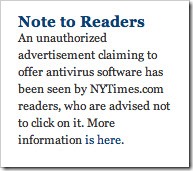
Unfortunately, this is not limited to Grooveshark (which was perfectly safe and well-behaved when I went back to it and got a legitimate Mazda ad instead of the poisoned ad). Last fall the New York Times home page briefly served up poisoned ads, and it has happened – and can happen – to any legitimate web site with advertisements.
Let’s focus again on the relevant rule for safe computing:
If a web site brings something up on your screen that might be malware, do not click on anything. If you click “NO” or “CANCEL,” there is a good chance that they lied and you actually gave permission to install the malware.
- If there is any chance that a dodgy web site is on the verge of installing a bad thing on your computer, start Task Manager and kill Internet Explorer from the list of applications there.
- If that’s not sufficient to close the possible malware window, see if you can identify it in the longer list of “Processes” in Task Manager.
- If neither of those work and you still have a window onscreen that might be dangerous, turn your computer off with the power button.
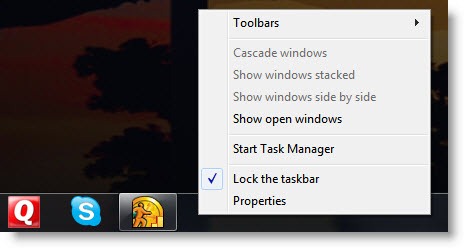
You can open Task Manager by hitting Ctrl-Alt-Del, or by right-clicking on the taskbar on the bottom of the screen and clicking on Start Task Manager.
If you think Internet Explorer is displaying a malware window, kill all instances of iexplore.exe on the Processes tab.
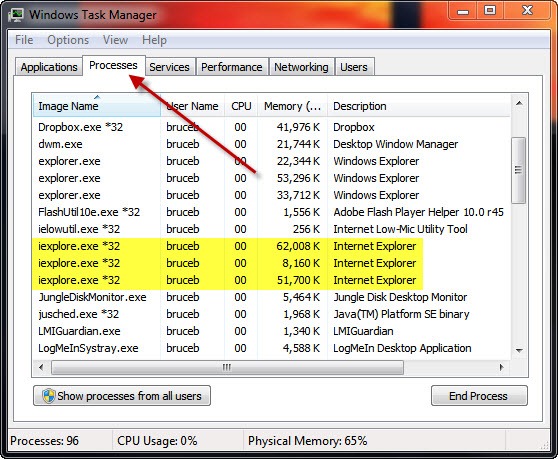
Tonight I killed all running instances of Internet Explorer, the malware window closed, and life went on normally.
Have I mentioned it lately? Be careful out there!

Hi-I used to have grooveshark-but it all the sudden tells me it is no longer available. Is this true?? what happeded
Shut down on April 30 after years of litigation with the record companies. Ten dollars a month to Spotify is a great deal to listen to anything, any time, any device.
Bad news folks! I am sure that Grooveshark is still contaminated. They sent me what was a pretty obvious phish and I checked with a friend of mine who sent me this post.
someone out there is just casting a net. but its three years later (2015).
pdw
I haven’t thought about Grooveshark for a long time! The ten dollars a month I send to Spotify now is well spent – legitimate access to a whole lot of music, just about anything I can imagine.
I too came across the pop up from Google Chrome, warning me there may be Malware spread across the website. This doesn’t seem to be resolving at all. Moving on to Spotify for my tunes.
Wow! A lot of time has passed since that original report. I would have guessed that Grooveshark had given that up. It’s still being pursued by the copyright police and spurned by the major labels, I think. Spotify is a bit frustrating (I’m not a fan of its tieup with Facebook) but it’s a lot better organized and more complete.
It just happened to me. An annoying flickering ad next to the music announced that I had ‘won an iPhone’ (yeah right). I couldn’t concentrate for the flicker and clicked on the x. It opened up the malicious website, crashed all my browser tabs and placed a pop-up window on all of them. I forced the browser down with force quit and it disappeared.
This is the website: [link removed]
I have encountered several very annoying flashing & flickering ads on Grooveshark lately. Some of them malicious looking, others looking legitimate. I think Grooveshark is loosing some of its coolness factor lately. The ads exposed while listening is part of the experience and shouldn’t be a pest, malicious or not.
I just encountered this too. Google chrome came up with a malware warning when an add on Grooveshark loaded.